MUSICDJ Mobility
Screens, sound and control for every vehicle in your fleet
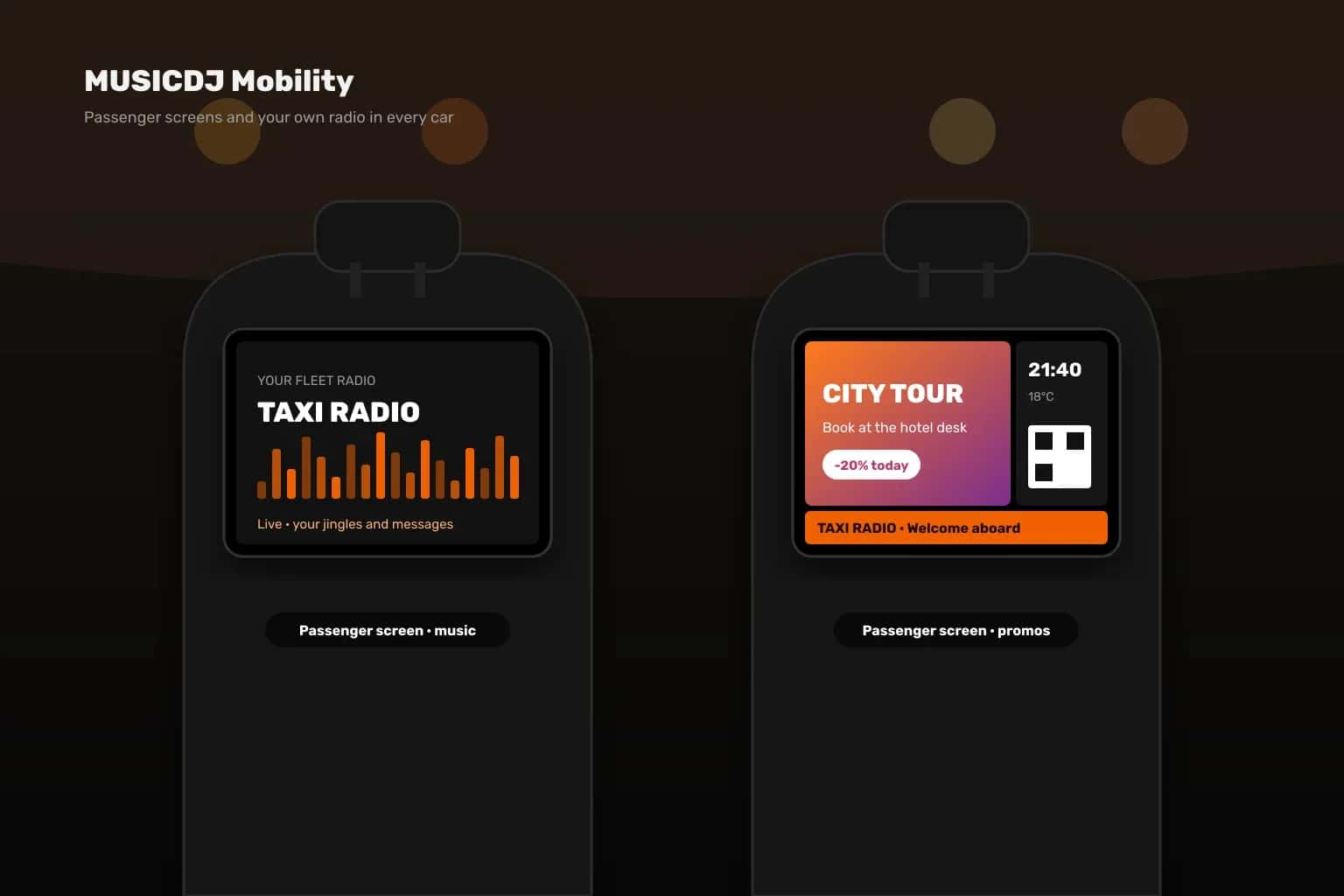
Passenger screens with your promos, your own fleet radio station and full remote control of every tablet — for taxis, VIP and airport transfers, shuttles and chauffeur services. Taxi fleets already run MUSICDJ every day.
Everything a fleet needs
One platform for what passengers see and hear, and for keeping every tablet running.
Passenger screens
Promos, partner offers, QR codes, weather and the time on a tablet for passengers, scheduled by day and hour.
Your own fleet radio
A radio station of your own with your music, jingles and messages, playing in every vehicle.
Android Auto for drivers
Drivers browse MUSICDJ playlists and stations on the car screen through Android Auto, with voice search.
Tablets — ours or yours
Pre-configured 4G tablets from us, or your existing Android tablets set up by the MUSICDJ team.
Location of every tablet
Locate any tablet on the map on demand, or follow it live for a couple of minutes.
Alerts that protect the hardware
Email alerts for a missing or weak charger, low battery and tablets that go offline.
Passenger screens that work on the road
The same MUSICDJ player that runs venue screens runs on the passenger tablet: playlists, split-screen layouts with a ticker, scheduling by date, day and hour, and background music or your fleet radio. Content is stored on the tablet, so it keeps playing when 4G drops in a tunnel or out of town.
Every tablet under control, wherever the car is
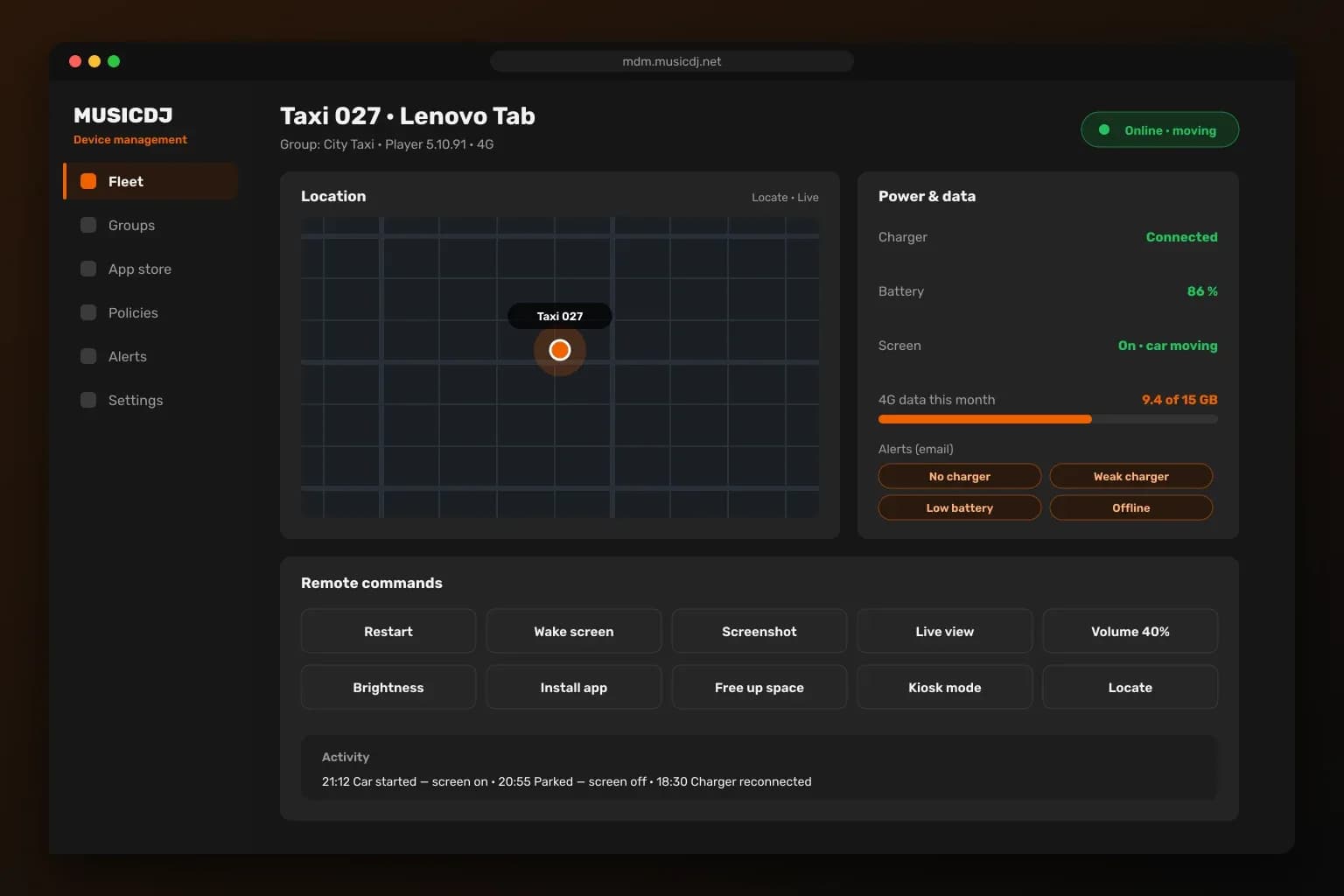
MUSICDJ device management shows each tablet’s status, battery, charger and 4G data use. Locate it on the map, take a screenshot, open live view, change volume or brightness, install apps or free up space — remotely. Tablets run in kiosk mode, so passengers always see your player, and the screen turns off when the car is parked and back on when it starts.
Built for life in a vehicle
Small details that keep hundreds of tablets working without anyone touching them.
Follows the car
The screen switches off when the car is parked and on again when it starts — based on power, motion and GPS.
Made for 4G
Data use per tablet for 4G, Wi-Fi and LAN, with a monthly limit and email warnings before you reach it.
Plays offline
Playlists, layouts and files are stored on the tablet and keep playing without a connection.
Kiosk mode
The tablet stays locked to the MUSICDJ player; Home and Back always return to it.
On-tablet warnings
When the charger is unplugged, the tablet plays your own sound alert and shows a red warning in 5 languages.
Silent updates
Player and app updates install in the background on every tablet in the fleet.
How it works
From the first tablet to the whole fleet.
- 1
Prepare the tablets
We supply pre-configured 4G tablets, or set up your existing Android tablets with a quick QR or cable process.
- 2
Fit them in the vehicles
Mount the tablet for passengers and connect it to the car charger — it starts and stops with the car.
- 3
Add content and radio
Schedule promos and messages in MUSICDJ Backstage and set up your own fleet radio station.
- 4
Monitor the fleet
See every tablet’s status, location and alerts in MUSICDJ device management.
Made for every kind of transport
Taxi companies
Passenger screens, fleet radio and tablets under central control.
VIP & airport transfers
A premium welcome screen and music for every guest on board.
Shuttles & hotel transport
Hotel information, offers and music between the airport and the hotel.
Tours & sightseeing
Tour information, partner offers and music on board.
Chauffeur services
A consistent brand experience in every car.
Corporate fleets
Company news and messages on vehicle screens.
MUSICDJ Mobility — FAQ
What do passengers see?+
Your promos, partner offers, QR codes, weather and the time — scheduled by date, day and hour, optionally with music or your fleet radio.
Can we use our existing tablets?+
Yes, Android tablets can be used after the MUSICDJ team sets them up (a reset and a quick QR or cable process). The player needs Android 7.0 or newer; for kiosk use we recommend a recent tablet.
Does it work without internet?+
Yes. Playlists, layouts and files are stored on the tablet, so passenger screens keep playing when the connection drops.
Can we have our own radio station?+
Yes. We set up a radio station for your fleet with your music, jingles and messages, playing in every vehicle.
Can drivers use it in the car?+
Yes. Drivers browse MUSICDJ playlists and stations on the car screen through Android Auto, with voice search.
Can we see where a tablet is?+
Yes. Locate any tablet on the map on demand, or follow it live for a couple of minutes.
How do we know a tablet has a problem?+
Email alerts tell you when a tablet runs without a charger, has a weak charger or low battery, or goes offline — and the tablet itself warns the driver with a sound and a red screen.
How is 4G data controlled?+
Data use is measured per tablet with a monthly limit and email warnings, so you can act before a SIM runs out.
Bring MUSICDJ to your fleet
Tell us about your vehicles — we come back with tablets, set-up and a plan for your fleet.