
Restaurants & cafés
Everything your restaurant runs on — sound, screens and guests
Day-parted music, menu boards that update themselves, a QR menu guests can order from and table reservations — one dashboard, one bill, for one restaurant or a whole chain.
Everything a restaurant needs
Pick what you need today and switch on more whenever you are ready.
A day in your restaurant
Set it once — MUSICDJ changes the mood, the screens and the menu as the day goes on.
- 1
08:00 · Breakfast
Soft acoustic music, the breakfast menu on the boards and in the QR menu.
- 2
12:00 · Lunch rush
Upbeat playlist, lunch specials on screen, guests order from the table to turn tables faster.
- 3
17:00 · Happy hour
An AI jingle announces happy hour; split screens show cocktails, prices and your Google rating.
- 4
20:00 · Dinner
Warmer music, dessert and wine promos on screen, reservations seated from your floor plan.
Menus that sell — on screen and on the phone
Change a price or mark a dish as sold out once, and it updates on every menu board and in the QR menu at the same time. AI creates appetizing photos and descriptions, and translates the menu for every guest.

One screen, several messages
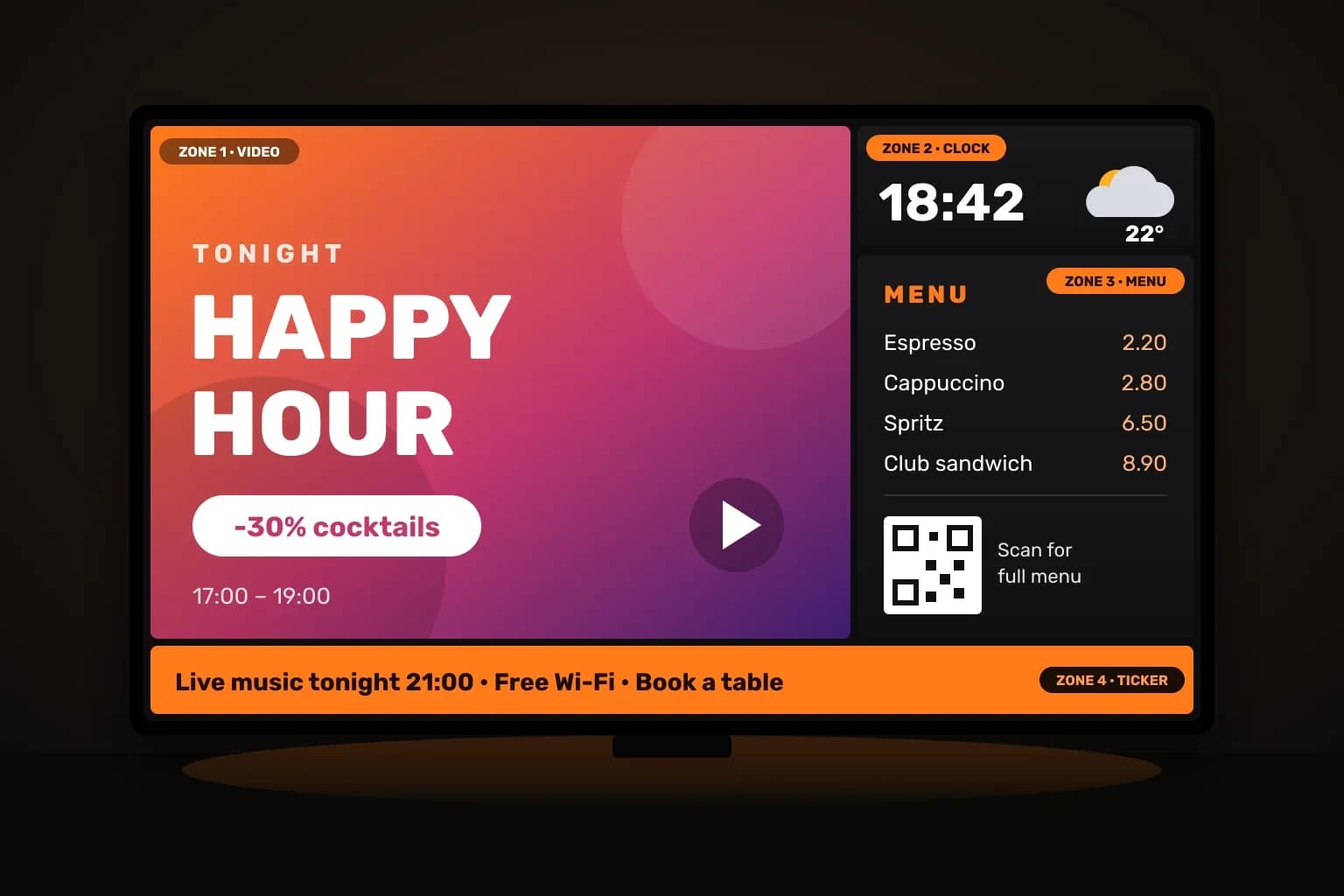
Split a screen into zones: a promo video, today’s menu with prices, the time and a scrolling ticker. Change it from the dashboard or from the MUSICDJ Remote app on your phone.
Get set up the easy way
Start on what you already have, or let us deliver and install everything.
Restaurants — FAQ
Do guests need to install an app?+
No. The menu, ordering, reviews and the jukebox open from a QR code in any browser.
Can I update prices everywhere at once?+
Yes. One change updates the menu boards, the QR menu and your Google menu.
Can guests order and pay from the table?+
Yes. Guests order from the table, for takeaway or delivery, and pay in the guest app; orders go straight to your staff app and kitchen display.
Can I take table reservations?+
Yes. Guests book online, you see every booking on your floor plan, and confirmations and changes are handled for you.
Can different rooms play different music?+
Yes. The dining room, bar and terrace can each have their own music and schedule.
Is the music licensed for business use?+
Yes. Our catalog is licensed for commercial use, unlike personal Spotify or Apple Music. Public-performance fees to your local collecting society are paid by the venue, as with any business music.
What hardware do I need?+
Nothing special to start: the Web Player runs in any browser, and the Android and Windows players run on boxes, screens and PCs you may already own. The MUSICDJ PLAYBOX adds offline playback, remote monitoring and silent updates.
Does it work for a restaurant chain?+
Yes. Groups, a master menu for every location and roles for each manager are built in.

Bring MUSICDJ to your restaurant
Create a free account and set up music, screens and your QR menu in an afternoon.